Ad-supported — we may earn a commission from links on this page, at no cost to you, and it never changes our assessments. How this works.
System Mechanic is best known as a PC tune-up tool: it clears junk files, manages startup programs and tries to keep an older Windows PC responsive. The Ultimate Defense edition adds real-time antivirus (System Shield), a removal tool for PCs that are already infected (Malware Killer), privacy tools, drive wiping, file recovery and a password manager — all for Windows only.
Below we look at what each edition includes, what's known about the antivirus behind it, and the renewal and refund terms, which are stricter than the headline guarantee suggests. iolo is a brand of RealDefense, LLC.

The short answer
System Mechanic · Best for Windows PC tune-up
Pick System Mechanic Ultimate Defense if you want Windows clean-up and speed-up tools first, with real-time protection, privacy tools and a password manager for the household's PCs — not if you need a Mac, phone or VPN covered.
- Tune-up, privacy and file-recovery tools in one Windows suite
- One licence for the household's PCs
Strengths and limitations
Strengths
- Tune-up, privacy, drive-wiping and file-recovery tools in one Windows suite
- One licence for the household's PCs
- Malware Killer for PCs that are already infected
- Support by phone and live chat around the clock
Limitations
- Windows only — no Mac, Android or iPhone version
- No current independent lab results; the VB100 badge on its site isn't backed by a current certification
- Under the license agreement of October 22, 2026, subscription fees are generally non-refundable, and added LiveTech support renews monthly unless cancelled
- No VPN in any edition
Who it’s for
- Households with one or more Windows PCs that want tune-up tools and real-time protection from one licence
- People who'd use the privacy tools, the drive wiper and file recovery as well
Who should look elsewhere
- Mac, iPhone and Android users
- Anyone who wants independently tested antivirus above all
- People who want a VPN in the same subscription
Inside the app: screenshots used with a friend's permission
Added Nov 2, 2026 · System Mechanic Ultimate Defense 22.3.1.124 (from the title bar) · Windows (version not recorded; the drive is labeled "Windows 7")
These screenshots don't come from our own install. A friend made them and agreed to let us publish them, and we added them on November 2, 2026. We don't know when the session they show took place. The title bar shows version 22.3.1.124 and the drive is labeled "Windows 7", so iolo's current version may look different.
This is a look at the interface, not a protection test: we didn't install the suite or run anything ourselves. The figures on screen come from the PC shown and say nothing about yours, which is also why we left out the finished antivirus scan.
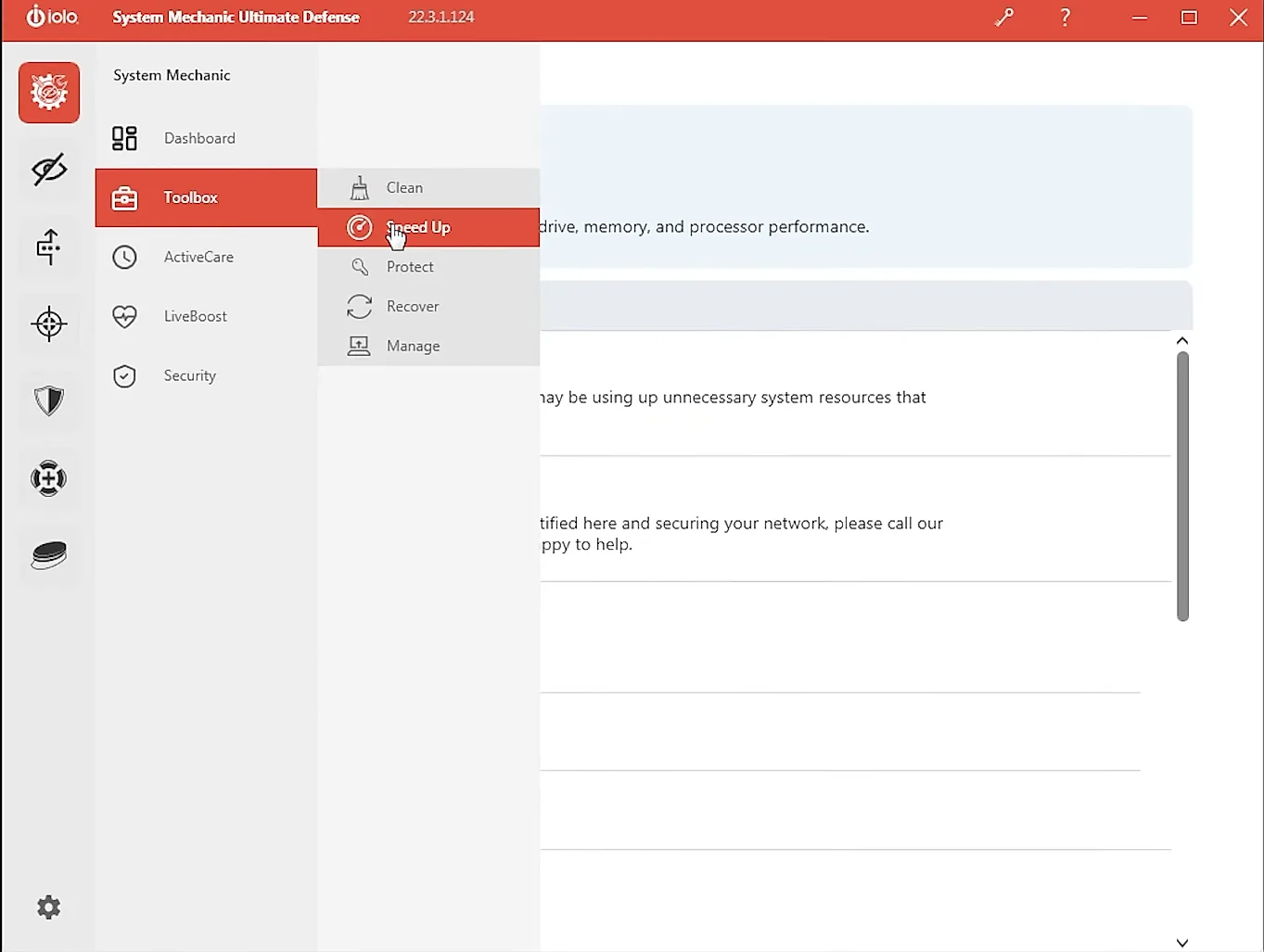
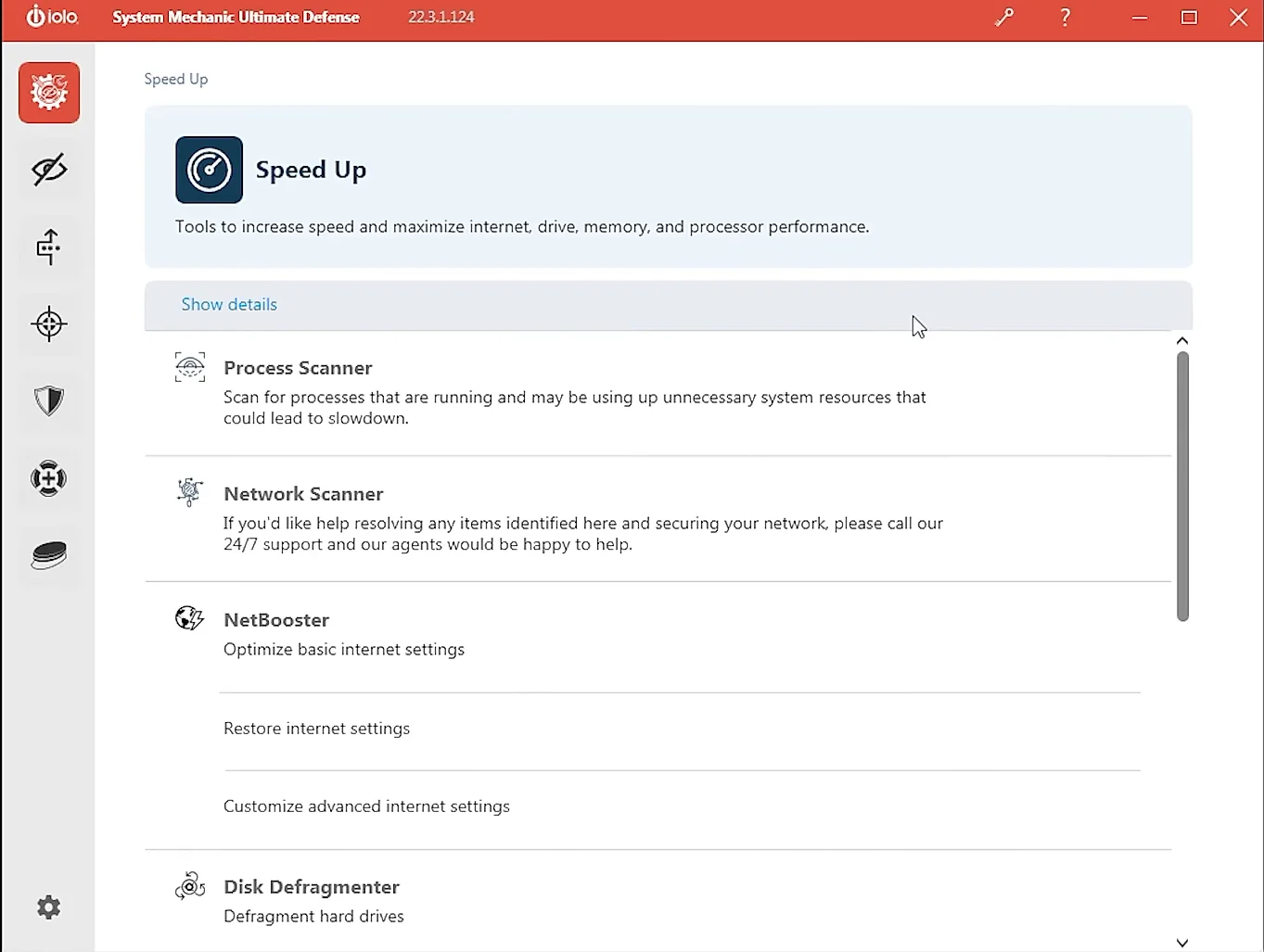
- The side menu splits System Mechanic into Dashboard, Toolbox, ActiveCare, LiveBoost and Security, and the Toolbox into Clean, Speed Up, Protect, Recover and Manage.
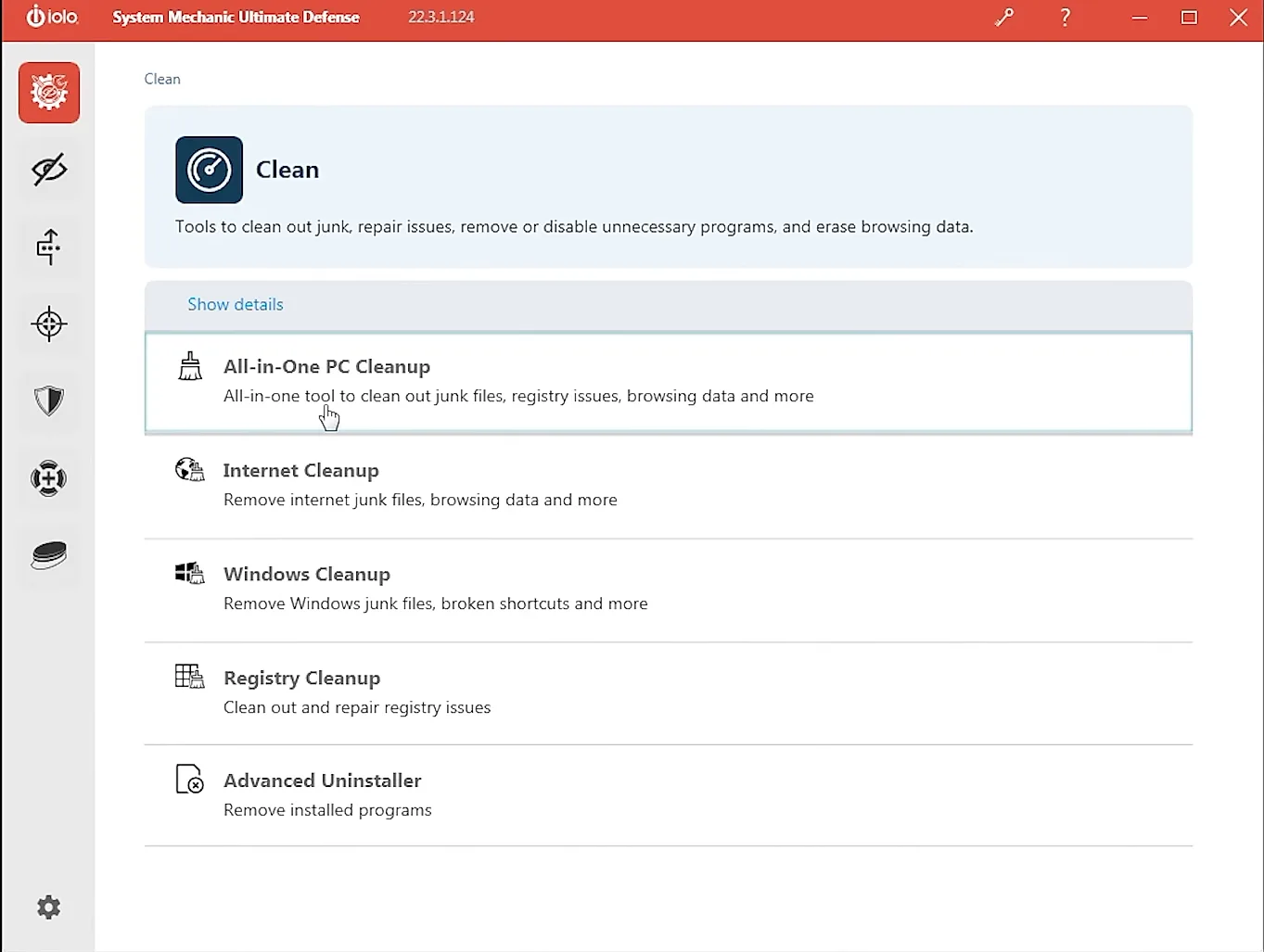
- Clean lists five tools: All-in-One PC Cleanup, Internet Cleanup, Windows Cleanup, Registry Cleanup and Advanced Uninstaller.
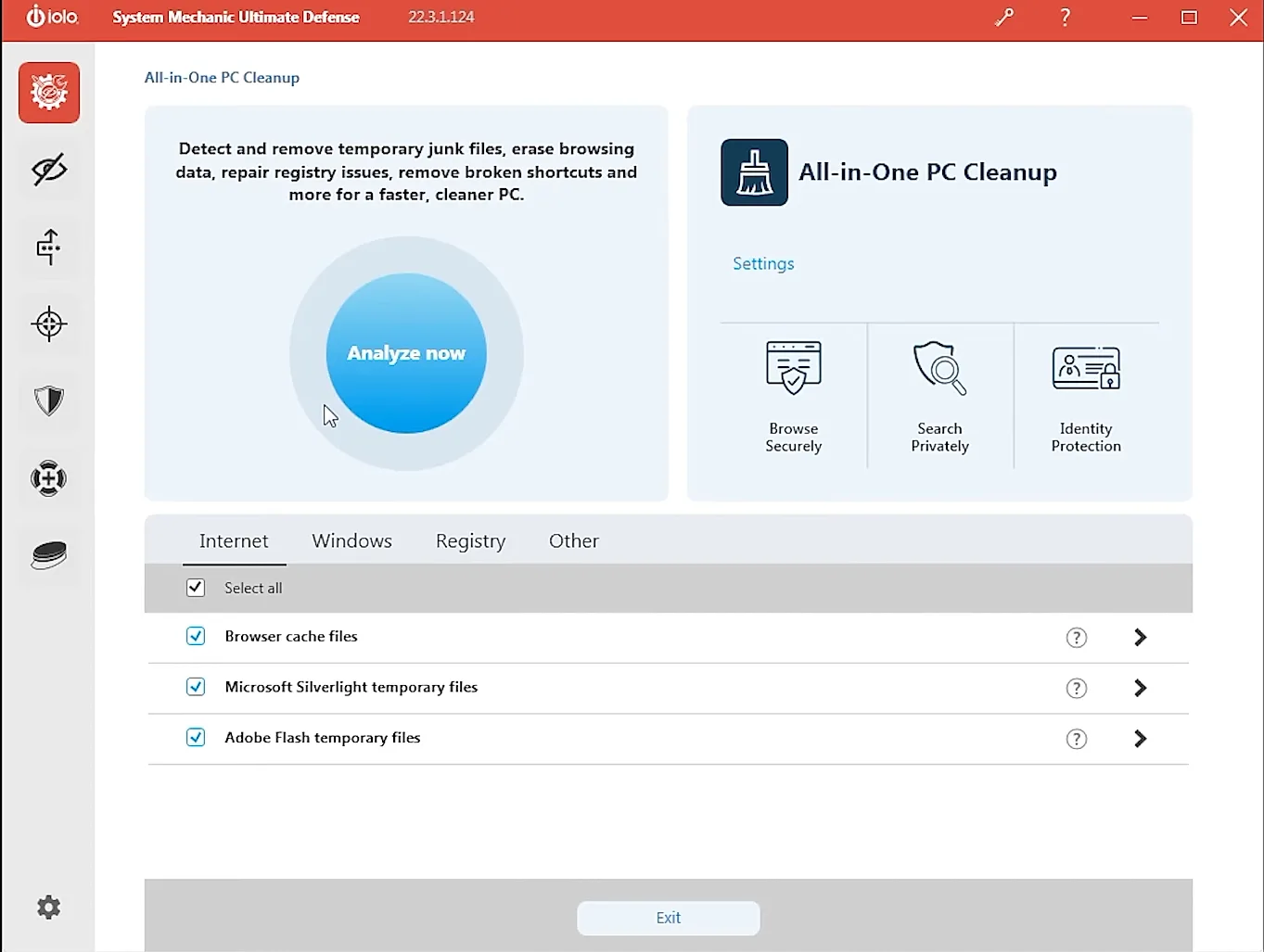
- All-in-One PC Cleanup opens with an "Analyze now" button and tabs for Internet, Windows, Registry and Other. On the Internet tab, browser cache, Microsoft Silverlight and Adobe Flash temporary files were all ticked. A panel on the right shows icons labeled Browse Securely, Search Privately and Identity Protection.
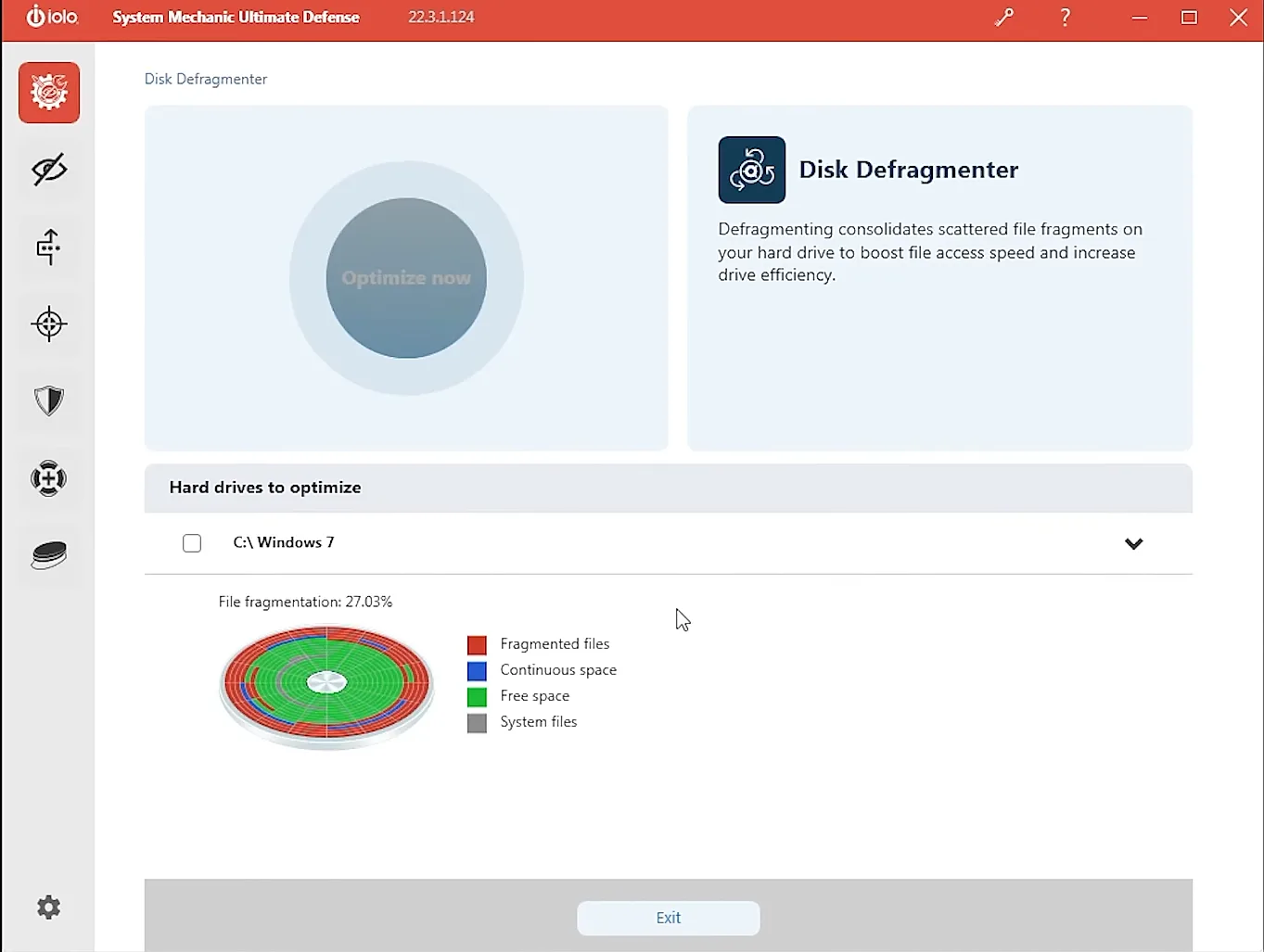
- Speed Up's list starts with Process Scanner, Network Scanner, NetBooster and Disk Defragmenter. Network Scanner's description suggests calling "our 24/7 support" for help with what it finds.
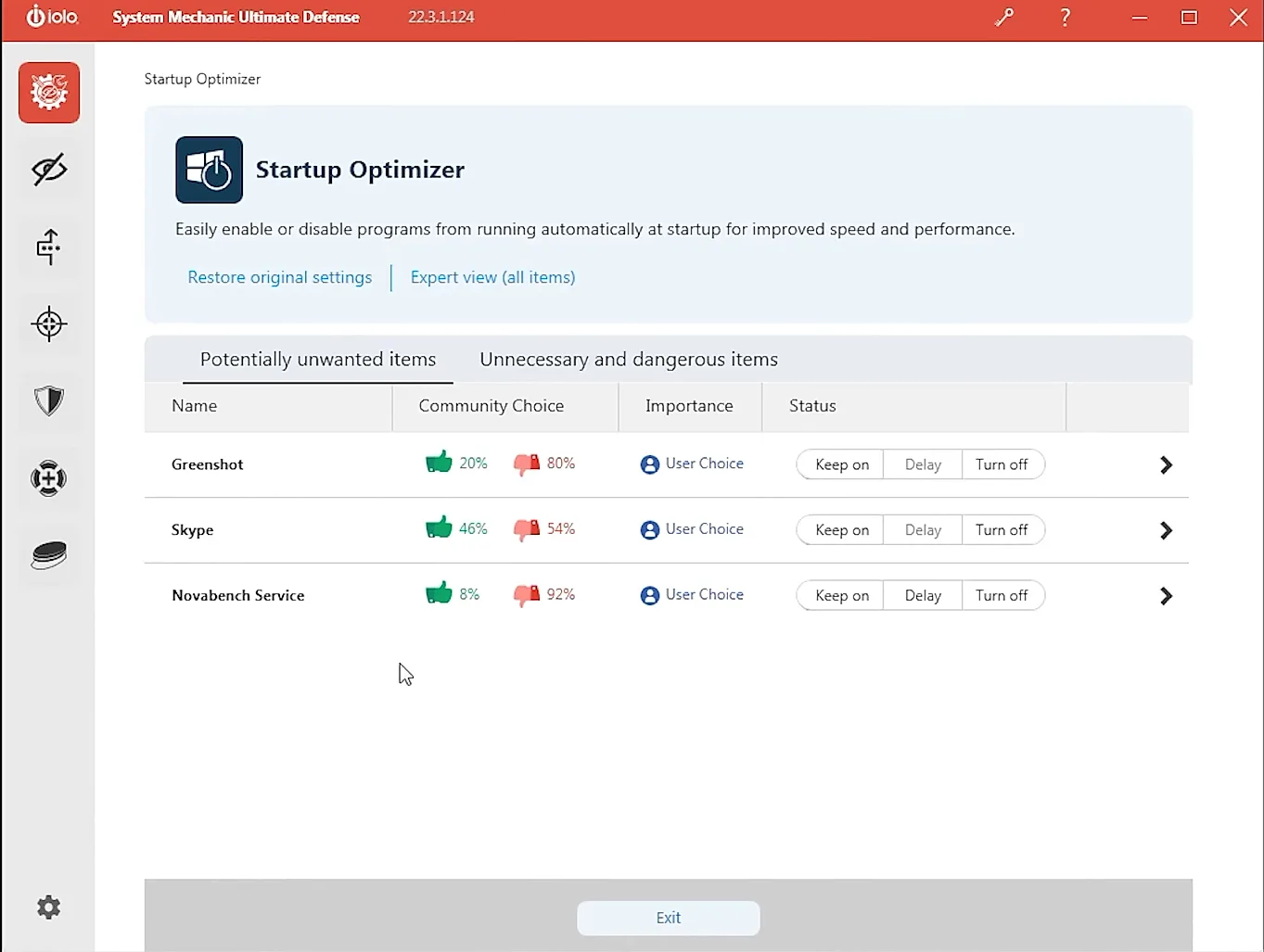
- Startup Optimizer shows a "Community Choice" thumbs-up and thumbs-down percentage for each startup program, next to Keep on, Delay and Turn off buttons. Its two tabs are "Potentially unwanted items" and "Unnecessary and dangerous items".
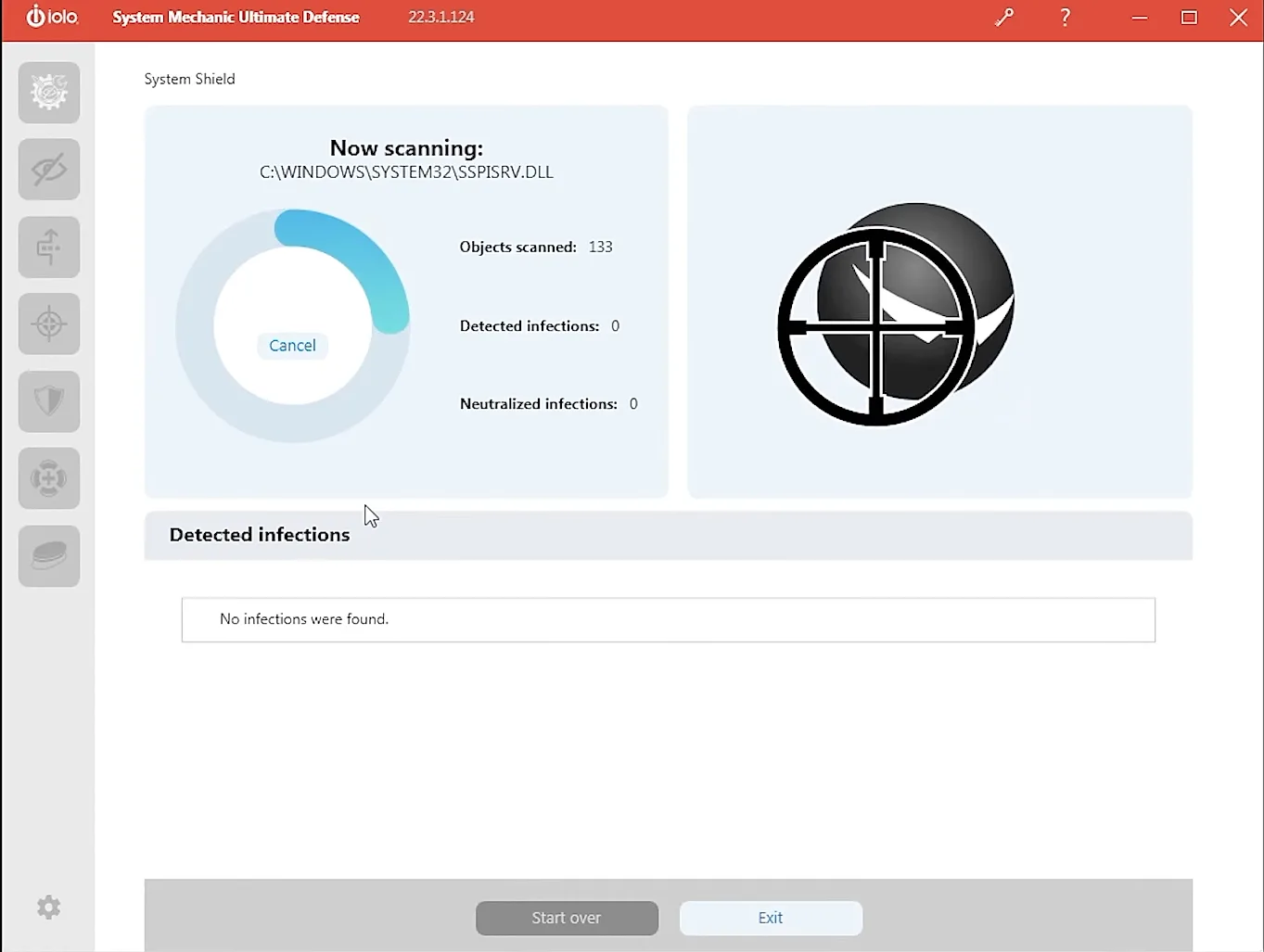
- System Shield, the antivirus part, shows the file it's scanning and running counts of objects scanned, detected infections and neutralized infections.
Screenshots used with a friend's permission. They aren't from our own install, and we don't know when the session they show took place. We cropped and sharpened them and changed nothing else.
Is System Mechanic Ultimate Defense worth it?
It can be if you want the tune-up tools. System Mechanic's clean-up, startup management and speed-up features are the core of every edition, and Ultimate Defense adds the security and privacy tools on top — for all the PCs in your home on one licence, according to iolo.
As a security product, the case is weaker. Windows already includes real-time protection, iolo doesn't publish current independent lab results for System Shield, and the edition you'd buy for the antivirus is the most expensive one. Check the renewal and refund terms below before you buy.
What System Mechanic's editions include
iolo sells System Mechanic in three paid editions — System Mechanic, System Mechanic Pro and System Mechanic Ultimate Defense — plus a free version. Only Pro and Ultimate Defense include antivirus: Pro adds real-time protection, System Shield and Malware Killer to the tune-up tools, and Ultimate Defense adds the Privacy Guardian tools and a password manager. iolo's pages describe the licence as covering up to 10 devices, or all your home PCs.
- Ultimate Defense combines System Mechanic's clean-up and speed-up tools with System Shield (real-time antivirus and antispyware) and Malware Killer for PCs that are already infected.
- Privacy Guardian adds anti-fingerprinting, automatic cookie clearing and a switch for Windows telemetry; DriveScrubber wipes drives, Search and Recover restores deleted files, and the ByePass password manager has browser extensions.
- iolo's licence agreement names Avira Operations GmbH as the provider of certain features of System Mechanic Ultimate Defense, System Shield and Malware Killer.
- There's no VPN: ioloVPN is sold separately.
The antivirus behind it, and lab testing
iolo calls its real-time protection System Shield and describes it with its own names, such as HyperScan. Its licence agreement names Avira Operations GmbH as the provider of certain features of System Mechanic Ultimate Defense, System Shield and Malware Killer — without saying which features — so Avira's own test results don't carry over to iolo's suite.
System Shield's product page shows a VB100 "lab certified" badge with no report or date. Virus Bulletin's own listing for iolo System Shield says the product isn't VB100 certified and isn't currently taking part in the programme, and AV-Comparatives' list of consumer antivirus vendors doesn't include iolo.
System Mechanic's renewal and refund terms
iolo's checkout says Ultimate Defense renews automatically every year at the then-current price, charged up to 35 days before the renewal date, and that the LiveTech support added to the order renews every month once its free month ends unless it's cancelled. Product pages promise a 30-day money-back guarantee. iolo's license agreement of October 22, 2026, which now replaces its sales and refund policy, no longer mentions a processing fee: it allows refunds of standalone software requested by phone within 30 days and says subscription fees are generally not refundable, so check which applies to your purchase before you buy.
System Mechanic on Windows — and nothing else
System Mechanic runs only on 64-bit Windows PCs — Windows 11, 10, 8.1, 8 and 7 — and not on ARM-based PCs. There's no Mac, Android or iPhone version of the suite; only the ByePass+ password manager also has iOS and Android apps.
If your household also uses Macs or phones, you'd need separate protection for them; most of the suites we rank cover Windows, macOS, Android and iOS with one subscription.
Who's behind System Mechanic
iolo has made System Mechanic since the late 1990s and is now part of RealDefense, LLC, which gives a Los Angeles address and lists iolo among the brands it took on in 2020. Support is by phone and live chat 24/7, in English only; iolo's support pages note that additional offers may be made on the phone, and LiveTech is a paid support service.
System Mechanic alternatives
- Best antivirus 2026
All seven suites ranked by the kind of user each fits.
- TotalAV review
Antivirus with tune-up tools on Windows, Mac, Android and iOS.
- Avira review
A free tier with Windows update and tune-up tools; Prime covers 25 devices.
- Is Windows Defender enough?
When the protection built into Windows is all you need.
- How to tell if you have a virus
The signs, and the steps to take first.
Our verdict
System Mechanic Ultimate Defense suits Windows households that want a PC tune-up suite with real-time protection and privacy tools in the same licence. As an antivirus it's harder to judge: iolo names Avira as the provider of certain features, but there are no current independent lab results for the suite itself, and its VB100 badge isn't backed by a current certification. If protection is your priority, one of the suites ranked above it is the safer choice; if you'd mostly use the tune-up tools, it's a reasonable all-in-one for PCs.
Bottom line
System Mechanic · Best for Windows PC tune-up
Pick System Mechanic Ultimate Defense if you want Windows clean-up and speed-up tools first, with real-time protection, privacy tools and a password manager for the household's PCs — not if you need a Mac, phone or VPN covered.
- Tune-up, privacy and file-recovery tools in one Windows suite
- One licence for the household's PCs
Sources · checked Nov 2, 2026
- iolo — System Mechanic Ultimate Defense
- iolo — System Shield
- iolo Knowledge Base — Minimum requirements
- iolo Knowledge Base — Whole home license
- iolo Knowledge Base — What is Privacy Guardian?
- iolo — End user license agreement
- Virus Bulletin — VB100 listing for iolo System Shield (archived, September 2025)
- AV-Comparatives — List of consumer AV vendors (PC)
- RealDefense — About us
What changed
- — Added eight screenshots of the app, used with a friend's permission and labeled as not from our own install.